Skip to content

Free plugin for WooCommerce

Stop card-testing attacks and fake orders

Bots use your checkout to test stolen cards. Brickmoat stops them before your payment provider is ever called, locks down by itself during an attack, and clears the mess afterwards.

Version 1.0.0, a ZIP you upload in WordPress. Free, no account needed. How to install

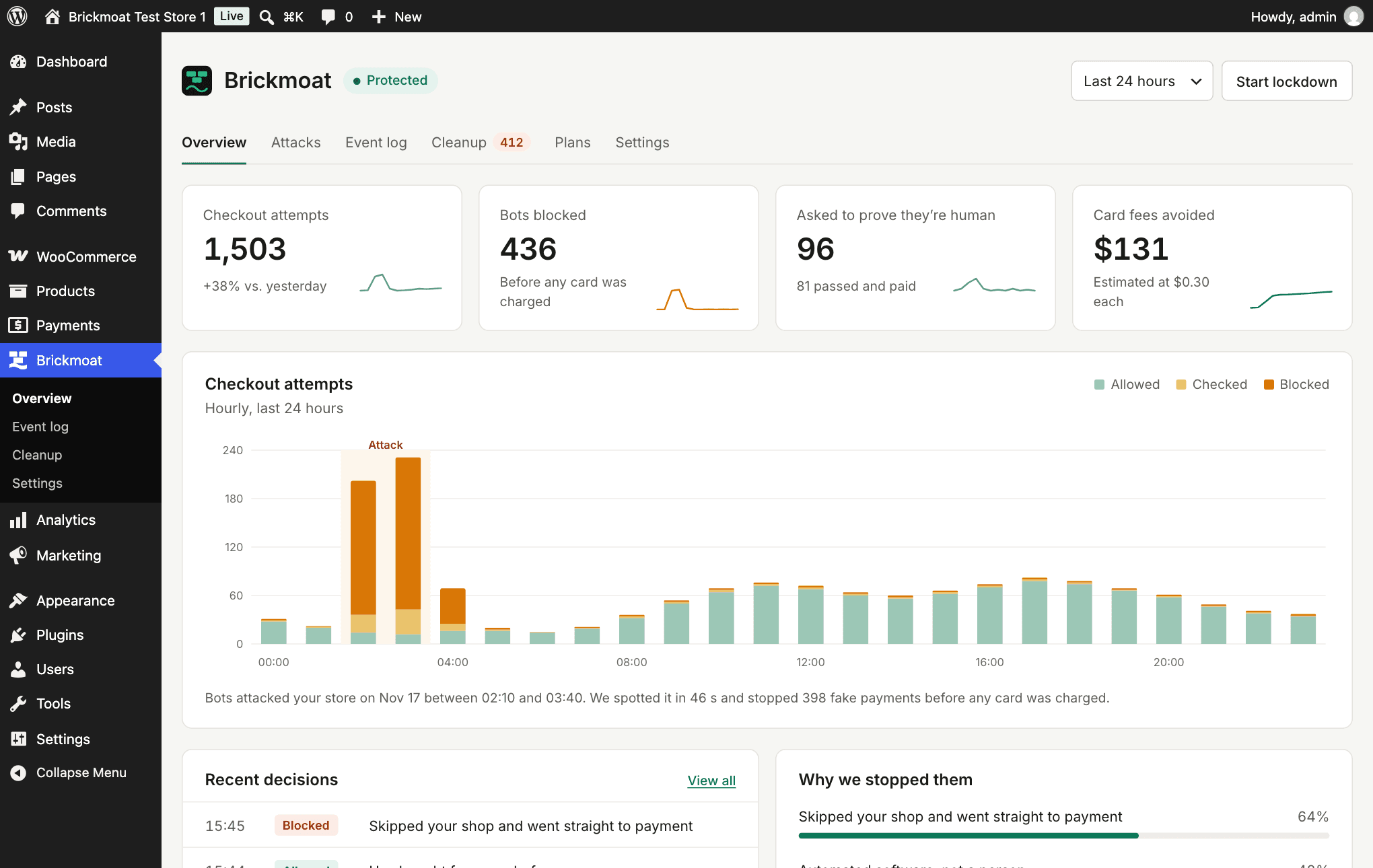
The Brickmoat overview inside WordPress: checkout attempts, bots blocked, an attack marked on the chart, and the reasons attempts were stopped (sample data)

The problem

Your checkout is a free card checker

Criminals with lists of stolen card numbers need to know which ones still work. They point a bot at a real shop, pick the cheapest product, and try card after card. The shop pays for it.

  • Hundreds of failed orders

    Each attempt leaves a failed or pending order behind, burying your real ones.

  • A fee for every attempt

    Depending on your payment provider, each authorisation can cost a fee, declined or not.

  • An inbox full of failures

    WooCommerce emails you about every failed order, and may email the card’s real owner too.

  • A warning from Stripe or PayPal

    A sudden wall of declines can get your account reviewed, limited or closed.

How it works

Three steps, and the first one is the only one you do

  1. Install the free plugin

    Activate it and your checkout is protected. There is nothing to configure and no account to create.

  2. It stops bots at checkout

    Every payment attempt is checked on your own server, before your payment provider is contacted. During an attack it locks down by itself.

  3. Pro shares protection across stores

    With Pro, a bot caught on any Brickmoat store is blocked on yours before it tries a single card.

During an attack

It notices the spike and locks down by itself

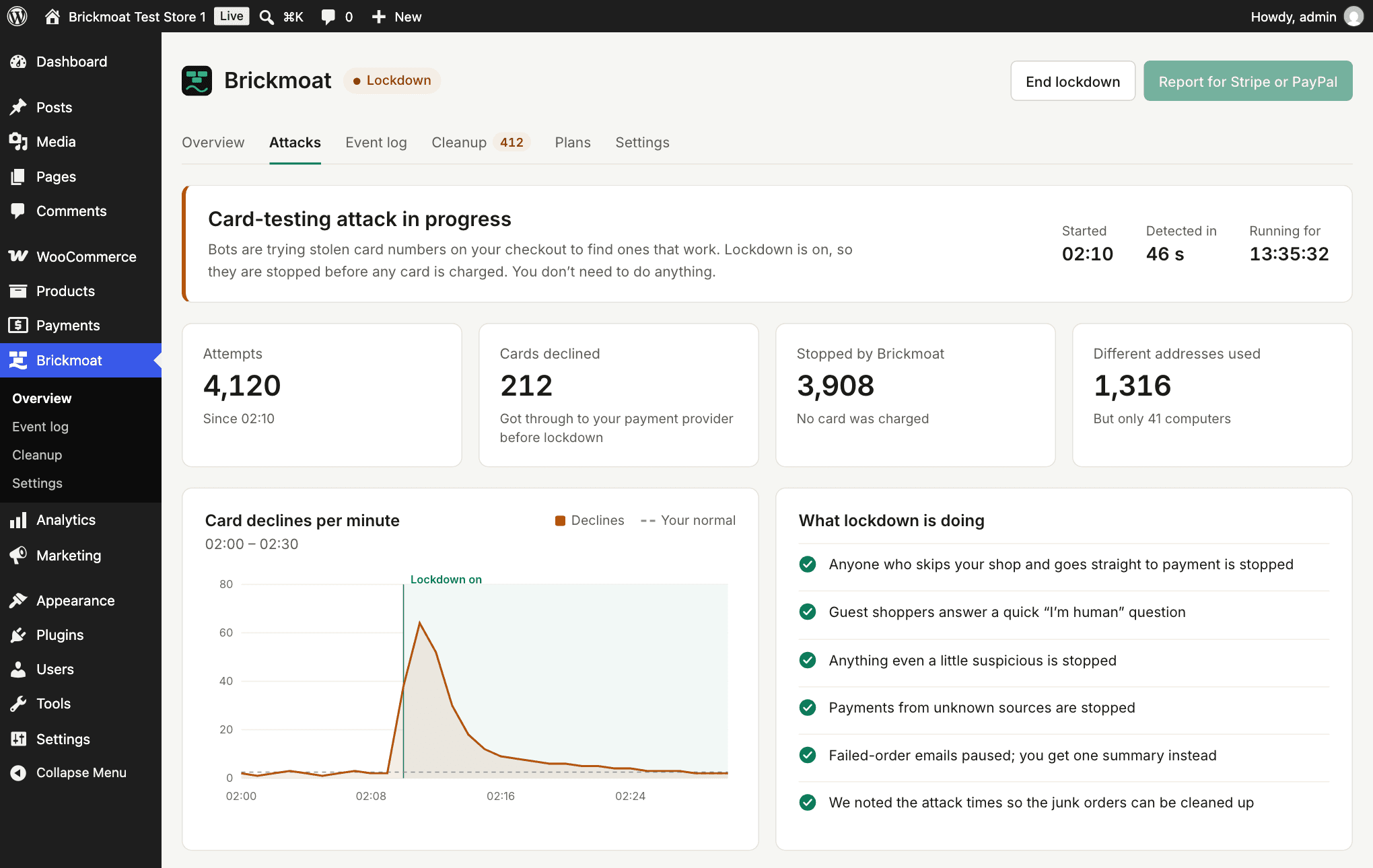
When declined cards spike, Brickmoat tightens every check at once. Guests answer a quick “I’m human” question, payments that skipped your shop pages are stopped, and you get one email, not hundreds. An hour after things calm down it relaxes again. Your checkout is never switched off, so real customers keep buying.

The Attacks screen during an attack: when it started, how fast it was detected, declines per minute falling after lockdown, and what lockdown is doing (sample data)
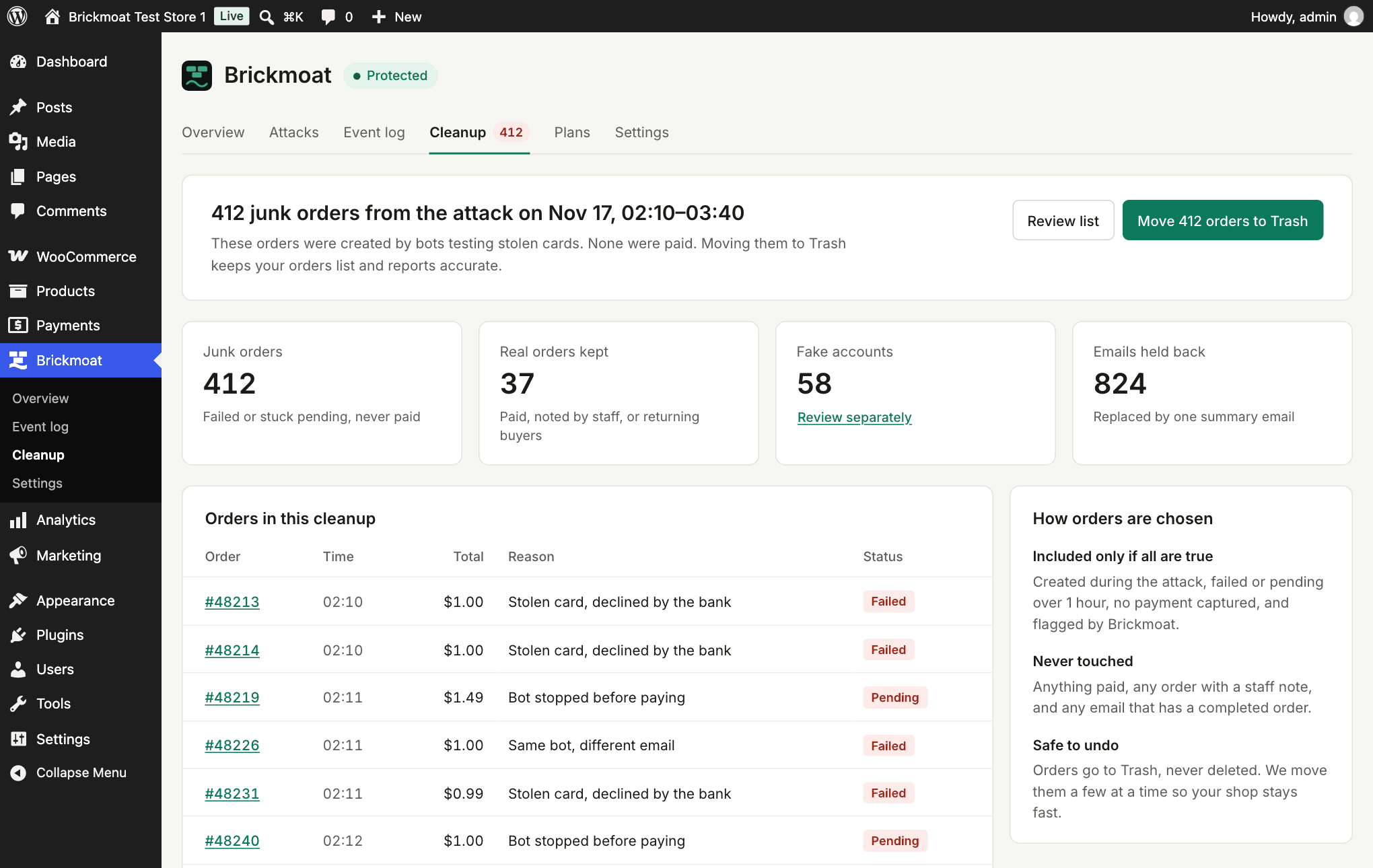
The Cleanup screen: the junk orders left by an attack, the real orders that are kept, and one button to move the junk to Trash (sample data)

After an attack

Clear the fake orders in one click

The failed and unpaid orders an attack leaves behind are gathered on one screen. One button moves them to Trash in the background. Anything paid, any order with a staff note and any returning customer is never touched, and you can undo it.

What you get, free

Everything needed to stop an attack and clean up after it

  • Every way to pay is guarded

    The block checkout, the classic checkout, the Store API, pay-for-order links and “add payment method”. Bots skip your shop pages and post straight to these, which is why a CAPTCHA on the checkout page is not enough.

  • Real shoppers are told apart from scripts

    A person browses before paying; a bot does not. Brickmoat checks for that quietly on your own server, with nothing for the shopper to do.

  • Failed cards are counted

    Too many attempts or declines from the same visitor, network, email or device and they are stopped, long before a working card is found.

  • Lockdown switches on by itself

    When declines spike, every check tightens and guests answer a quick “I’m human” question. It relaxes after an hour of calm. Your checkout is never switched off.

  • Fake orders are cleared in one click

    Failed and unpaid orders left by an attack go to Trash in the background. Paid orders, orders with staff notes and returning customers are never touched, and it can be undone.

  • One email, not hundreds

    Failed-order emails from an attack are held back and replaced by a single summary, so your inbox and your customers’ inboxes stay clear.

A plain reason for every decision

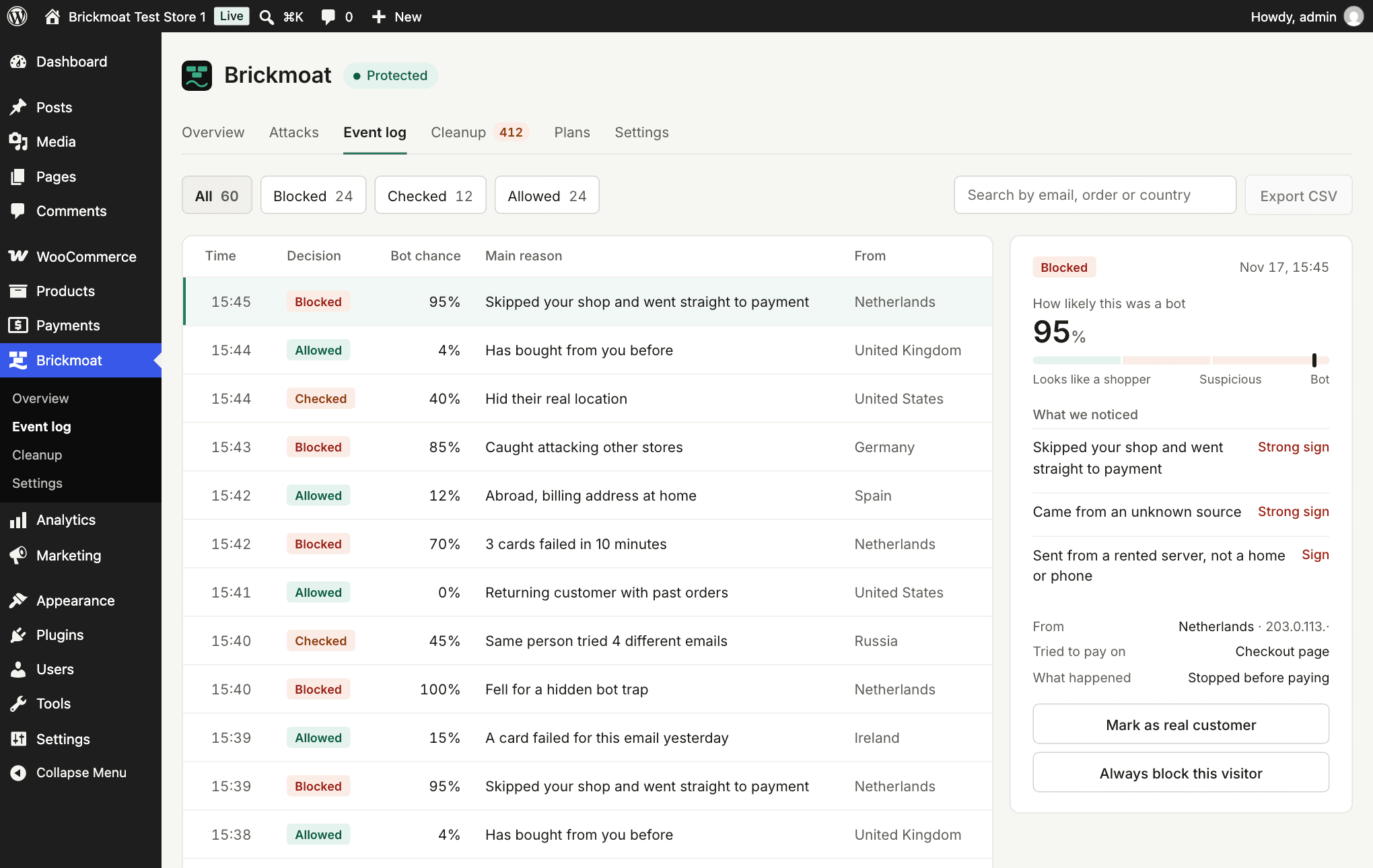
The event log lists each checkout attempt and says, in ordinary words, why it was allowed, checked or blocked: “skipped your shop and went straight to payment”, “3 cards failed in 10 minutes”. If a real customer is ever stopped, one click lets them through for good.

  • Checks run on your server and take a few milliseconds.
  • If anything inside Brickmoat fails, the order is allowed.
  • Card numbers never reach Brickmoat.
The event log: each checkout attempt with its decision, how likely it was a bot, and the signs Brickmoat noticed (sample data)

Pricing

Free does the job. Pro adds what one store cannot do alone.

Nothing in the free plugin is locked or time-limited. Pro is the part that runs on our servers.

Free

$0 forever

Stops card-testing attacks and cleans up after them. Complete on its own.

  • Protects every way to pay
  • Stops bots trying card after card
  • Locks down by itself during an attack
  • Clears fake orders in one click
  • A plain reason for every block
  • Email alerts
  • 7 days of history
Download the free plugin

Pro

14 days free

$19 per month, or $149 a year

Adds protection learned from every other Brickmoat store.

  • Everything in Free
  • Blocks bots caught on other stores
  • Slack, Discord and text-message alerts
  • Ready-made report for Stripe or PayPal
  • 90 days of history
How Pro works

Checkout opens soon. The free plugin is ready now.

Agency

$79 per month, up to 25 stores

For agencies and freelancers looking after client stores.

  • Everything in Pro
  • One dashboard for every store
  • Lock down or clean up a store remotely
  • Reports with your own name and logo
How Agency works

Checkout opens soon. The free plugin is ready now.

Compare the plans in detail

Questions

The ones store owners ask first

Do I need an account or an API key?

No. The free plugin works completely on its own, inside your WordPress. A licence key is only needed for the optional Pro service.

Which payment providers does it work with?

It guards WooCommerce’s own checkout routes, before the payment provider is contacted, so it does not depend on which gateway you use.

Will it block real customers?

It is built not to. Returning customers and logged-in staff skip the checks. An unsure case is asked a quick “I’m human” question rather than blocked, and blocks expire on their own. If a real customer is ever stopped, open the event log, select the attempt and choose “Mark as real customer”.

Does it slow down my checkout?

No. The decision is made on your own server from data already at hand, in a few milliseconds. The event log is written after the page has been sent to the shopper.

Can I undo a cleanup?

Yes. Orders are moved to Trash, never deleted. Use Undo on the Cleanup screen, or restore any order from Trash.

Read all the questions and answers

Protect your checkout today

Install the free plugin and your checkout is protected straight away. There is nothing to set up and no account to create.

Version 1.0.0, a ZIP you upload in WordPress. Free, no account needed. How to install